
We’re always working on exciting new features to make your solar design and sales experience even better. Many of these are available early through Beta Features. Here’s how you can enable them on your account:
Step 1: Log in to OpenSolar
Sign in to your OpenSolar account as you normally would.
Step 2: Open Your Profile
At the top-right corner of the navigation bar, click on your User Profile.
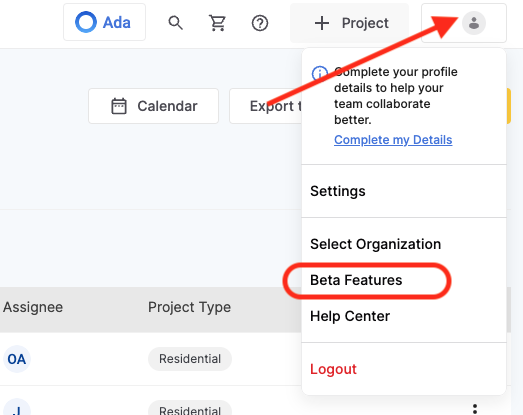
Step 3: Access Beta Features
From the profile menu, select Beta Features. You’ll see a list of the new tools currently available for early access.
Step 4: Enable Features
Simply toggle on whichever features you’d like to try out.
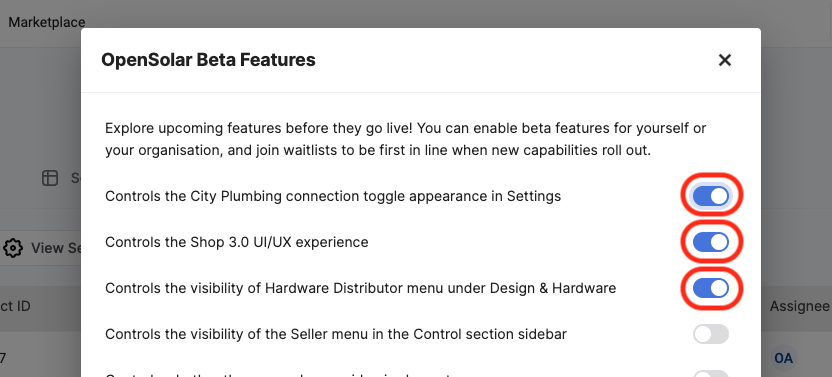
Once enabled:
- AI Lead Gen and Ada Auto Design will be immediately available for configuration in the Control section of the app.
- If you’d like access to the next-generation Sales Machine proposal templates, you can opt in to the early access group from the same section.
What Happens Next?
Once you’ve enabled a feature, it’s ready to use straight away. You can always return to the Beta Features menu to turn features off again if needed.
These features will move out of Beta and into the mainstream eventually, so these toggles won't be there forever.
That’s it — you’re all set to explore the newest OpenSolar innovations before they’re widely released!
Comments
0 comments
Please sign in to leave a comment.